Afterworld Controls, UI, and Onboarding
One button to start, the rest is classic Paradox — what is confirmed and what is not.
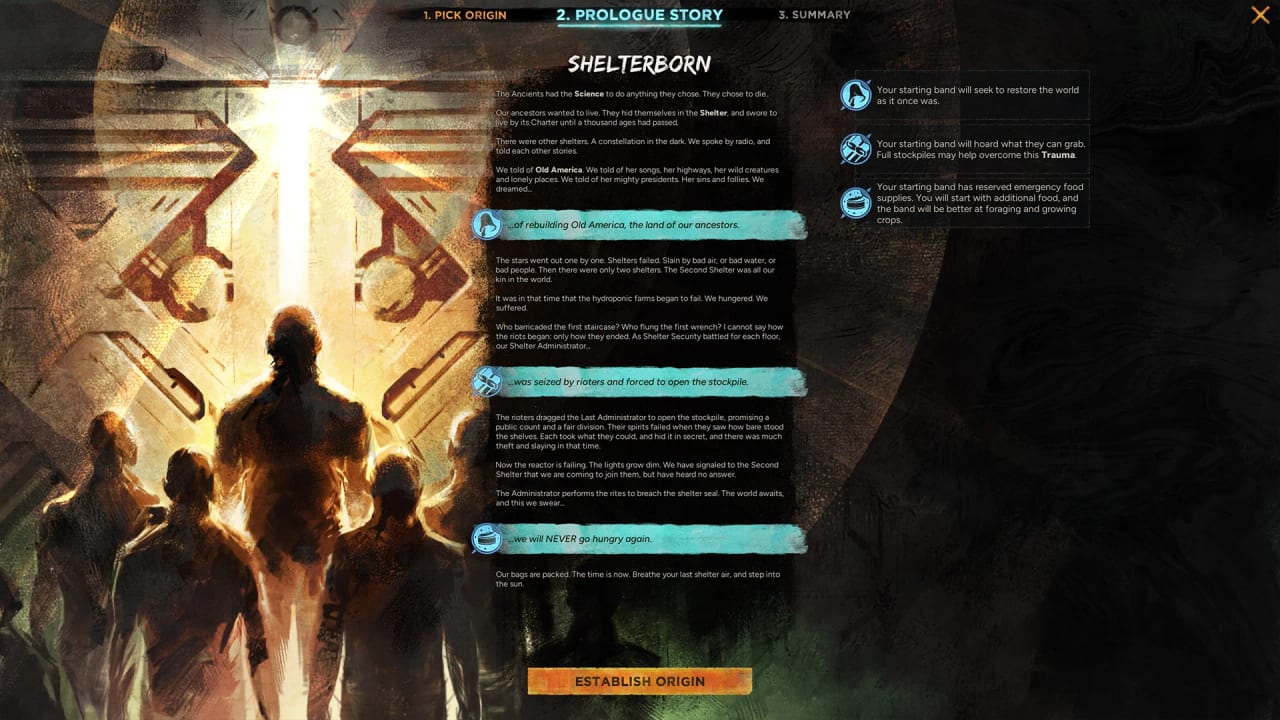
Afterworld’s controls story is the smallest confirmed fact and the biggest open question in the same sentence. Paradox has confirmed, via the gamescom briefing reported by heise on 27 August 2026, that the onboarding pitch is ‘one button at the start.’ That is the only control line Lind has spoken on the record. Steam still shows TBC system requirements and there is no published keybind table. This page collects what we know about the UI (settlement cards, policy toggles, character panels, the world-map combat) and what we explicitly do not know about keybinds. The hub for all systems guides is the guides hub. Read this beside getting started and how to play so the controls sit in the full loop.
The one-button pitch
Lind told the gamescom briefing that Afterworld is a Paradox game with only one button at the start. Combined with the store copy ‘easy to learn, difficult to survive,’ that is the onboarding promise: a player can be in the world without reading a tutorial wall. It is not a control scheme. It is a marketing line that the wiki treats as confirmed-but-narrow.
What ‘one button’ probably means in practice: the founding decision (pick your origin, place your camp, name your leader) is the first interactive moment, and everything else — law toggles, scout orders, convoy directions, migration — lives behind sub-menus that the game introduces by context. That is the Crusader Kings opening pattern, not the Hearts of Iron opening pattern. If you bounced off CK3’s tutorial, Afterworld will probably look familiar.
What ‘one button’ does not mean: there is no other input. Afterworld is a PC-only Paradox grand strategy game. You will mouse-click across a regional map, drag selection boxes over scouts, open settlement cards, scroll through Ideas Tree pop-ups, and issue orders to named characters. None of those have keyboard shortcuts confirmed, but the genre convention is to expose them once a player has run the system for a few turns.
What the B-roll UI actually shows
The official alpha B-roll released with the announcement is ten minutes of UI you can study. The visible screens include:
- A founding screen with named character portraits and a starting resource pop-up.
- A regional map with a soft hex tile, a scouting ring, and fog of war.
- A settlement card with named character portraits on the right rail, food / water / fuel gauges across the top, and a row of policy toggles for literacy, labour crews, drinking, slavery, and town-hall governance.
- An Ideas Tree popup triggered by scouting return.
- A character panel with stats and assignment options.
- A combat slice on the world map with brief formation animations and no separate tactics screen.
- A politics screen showing an Ancient-style character portrait and a ‘kneel or defy’ choice.
None of those screens are labelled with a keybind. None of them have a tooltip strip of hotkeys along the UI edge. That is normal for an alpha: tooltips ship later. The wiki will not invent a F1-F12 map until Paradox ships one.
Keyboard and mouse conventions you can assume
Even without a confirmed keybind table, the PDS convention is well known and Afterworld is built on the same engine family as other PDS titles. Plan for:
- Left-click to select a tile, unit, character, or UI element. Double-click to recenter the camera on a selected entity.
- Right-click to issue a move, attack, or interaction order, or to back out of a sub-menu. This is how every Paradox GSG since EU3 has worked.
- Mouse-wheel to zoom the regional map in and out. The game also supports a click-to-edge scroll on the world map.
- Middle-mouse drag to pan the camera. The B-roll implies panning works but does not show the bind.
- Number keys to cycle through named characters, settlements, or selected units once you have more than one open.
- Tab to open or close the character / settlement / ideas side panel — common in the engine family.
- Escape to close the active sub-menu. There is no confirmed ‘pause’ hotkey, but the genre convention is space-bar or pause-button to halt the simulation.
These are PDS-convention assumptions, not Paradox-confirmed controls. The wiki will list them as such and replace each one with an official keybind the day a diary or settings panel ships them. Do not pre-print a card with hotkeys you have not seen in a Paradox screenshot.
What we still do not know
A lot. There is no published Afterworld keybind table. There is no published cursor list (more than one cursor type was visible in the B-roll, but no list of meanings). There is no confirmed accessibility layer beyond the ‘easy to learn’ pitch. There is no confirmed gamepad or controller support, although the gamescom booth is reported to have used mouse-and-keyboard.
What we expect to land before launch:
- A settings menu with rebindable keys. Every PDS release since EU4 has shipped one.
- A tutorial pop-up layer for first-time players, even if the founding is one-button.
- A mod-friendly input layer if mod tools ship, which the FGS interview said they would.
- A camera-zoom-and-pan control suite. The B-roll implies mouse-only.
We will keep this page honest about those gaps. New entries will land here first, and the updates hub will announce when a diary or settings dump closes one of them.
How this fits the rest of the wiki
Controls live in the wiki under guides alongside how to play, which explains the loop, and combat, which explains how regional-map battles resolve. If you are wondering how the law toggles actually click through, the settlements guide covers that screen. If you are wondering how the religion toggles hook up, the religion guide covers that. If you are wondering how the trade window looks, the first-look preview covers the B-roll UI in narrative order.
Hardware watchers should keep system requirements open — Paradox still prints TBC on the Steam page. If you only want the short version: Afterworld is a Paradox PC GSG with a one-button opening, a mouse-and-keyboard control scheme, and a UI that looks closer to Crusader Kings than to Hearts of Iron. Wait for a keybind table before you bind anything to a stream deck.
A fair one-line summary for the wiki: Afterworld controls are the genre convention plus a one-button onboarding pitch, with no published keybind table yet. That is enough to plan a mouse hand and a pause-button reflex when the doors open.
Frequently Asked Questions
Quick answers about Afterworld before launch.
Does Afterworld have a confirmed keybind list?
No. Paradox has only confirmed the 'one button at the start' onboarding pitch from the gamescom briefing. The wiki lists PDS-convention defaults separately so they can be replaced by official bindings. See controls.
Will Afterworld support a controller?
Not announced. Gamescom coverage used mouse and keyboard. The wiki will update when a diary or settings panel confirms support.
How many buttons do I press to start?
One, per Lind's gamescom briefing. That button likely fires the founding decision (origin, location, leader). Everything else opens behind sub-menus that the game introduces contextually.
Where do I learn what each UI screen does?
Read how to play for the loop, settlements for the settlement card, and religion for the orthodoxy toggles. The B-roll UI is also walked through on gameplay deep dive.